


 Visit website

LuciQA
AI Assistants
Freemium
About
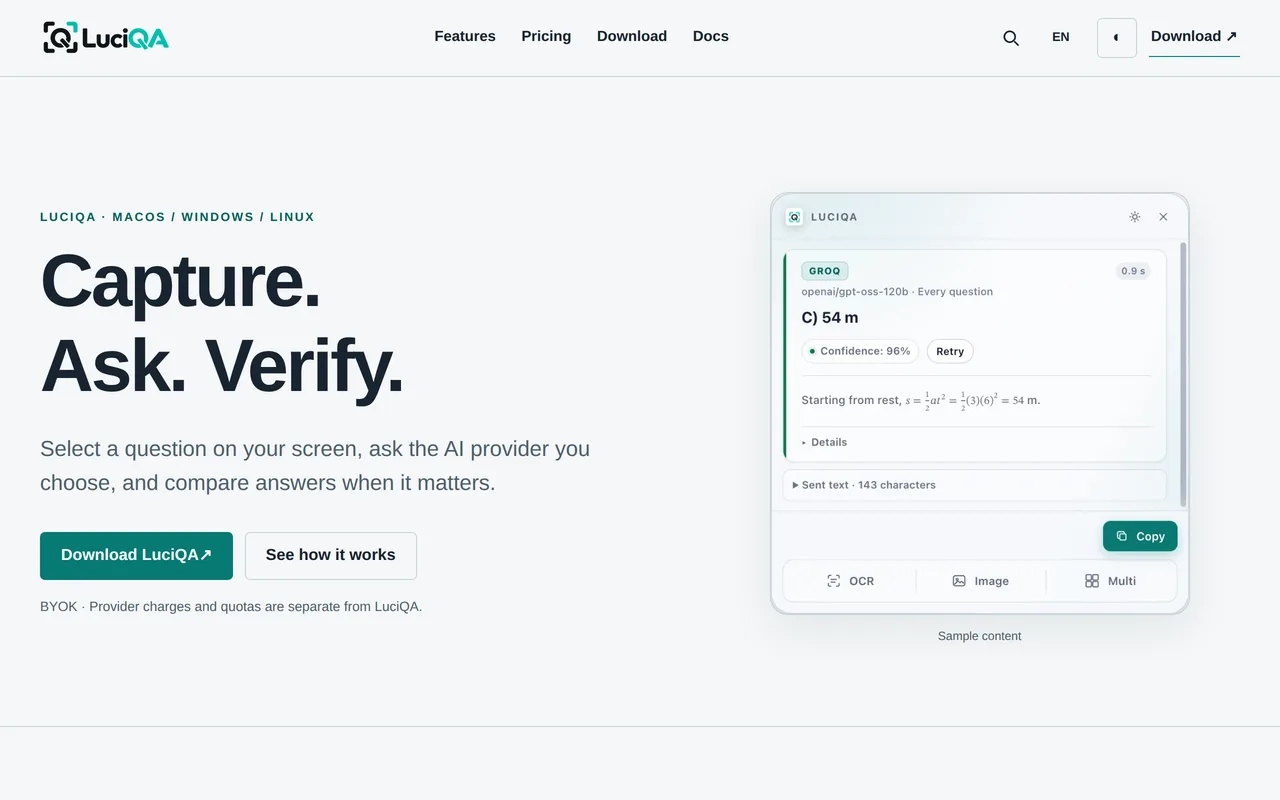
Get AI answers for any question on your screen.
LuciQA lives in the menu bar or system tray on macOS, Windows and Linux. Select a question on screen, send it to an AI provider of your choice, and put answers side by side when it matters. You can set answer style, thinking level and theme, review several questions in one capture, and use it in nine languages.
Features & use cases
- Starts from the menu bar or tray
- Choose your AI provider
- Compare answers side by side
- Several questions in one capture
- Nine languages
Who reaches for it
- Students and professionals who want quick answers without switching apps
Ready to try LuciQA?
Opens luciqa.com in a new tab.
Made LuciQA? Add the badge to your site
Paste this where you show press or listings. It links back to this page.

<a href="https://designbookmark.com/tool/luciqa?ref=badge" target="_blank"><img src="https://designbookmark.com/badge/listed-dark.svg" alt="Listed on DesignBookmark" width="200" height="56"></a>

<a href="https://designbookmark.com/tool/luciqa?ref=badge" target="_blank"><img src="https://designbookmark.com/badge/listed-light.svg" alt="Listed on DesignBookmark" width="200" height="56"></a>
Similar tools
The weekly drop
The best new tools, every week. No spam, unsubscribe anytime.